Anchored VWAP Indicator for MT4 (Free Download)
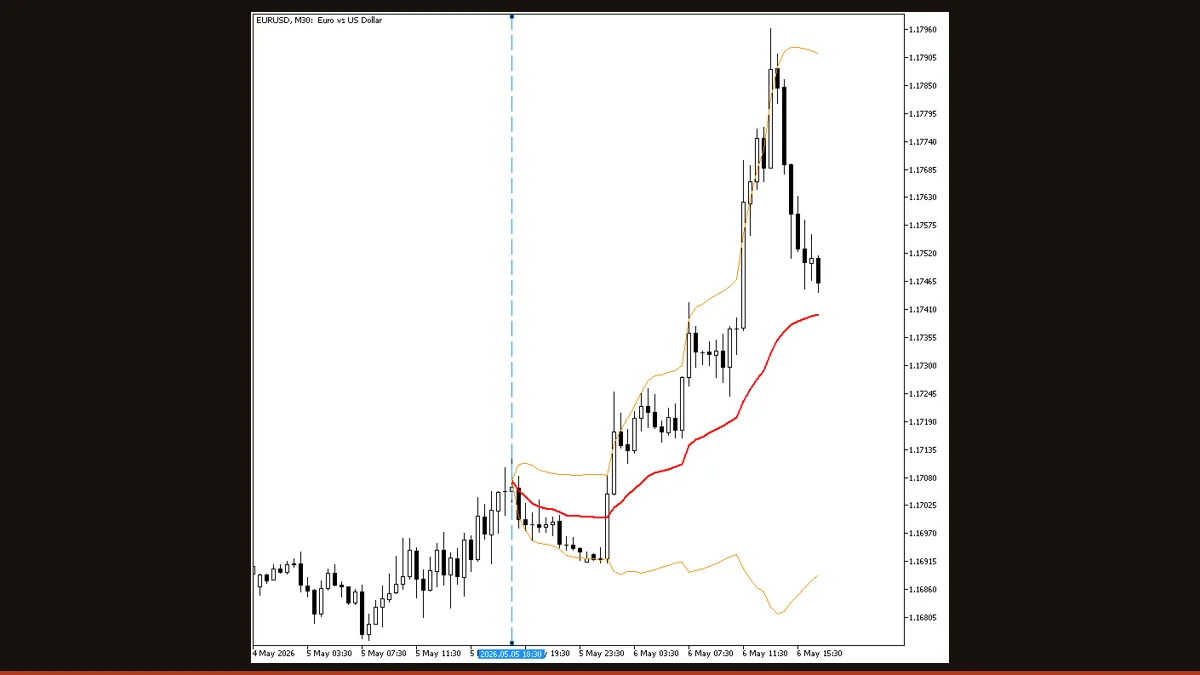
Anchored VWAP plots the volume-weighted average price from a bar you pick, a swing high, a news candle, or the session open, instead of resetting daily. It shows the average price every trader has paid since that anchor, with optional standard-deviation bands. Free for MT4 and MT5.
Most traders know the standard VWAP that resets at the start of each trading day. Anchored VWAP takes the same volume-weighted math but lets you choose where the calculation begins, a major swing low, the candle a central-bank headline printed, or the start of any week or month. From that anchor forward, the line shows the true average price participants have paid, weighted by how much volume traded at each level.
This page covers what the indicator actually does, the logic behind it, every setting that changes its behaviour, and the honest limitations you should know before you trade off it. The download is free and license-clear for both MT4 and MT5.
What is the Anchored VWAP indicator?
Anchored VWAP is a volume-weighted moving average that starts from a single bar you select rather than resetting on a fixed daily schedule. Where a normal moving average treats every bar equally and a daily VWAP forgets yesterday, the anchored version remembers everything from your chosen origin and weights each price by the volume that traded there. The result is a single line representing the breakeven price of everyone who entered after the anchor, and three optional bands at one, two, or your chosen number of standard deviations above and below it.
Because the anchor is yours to place, the same indicator answers very different questions. Anchor it to a swing low and the line becomes dynamic support that bulls defend. Anchor it to a news spike and you see whether the move has been accepted or rejected. Anchor it to the year's open and you get a long-term fair-value reference institutions actually watch.
How does the Anchored VWAP indicator work?
The calculation is deliberately simple, which is part of why it is reliable. From the anchor bar forward, the indicator keeps a running sum of price × volume and a separate running sum of volume. The VWAP at any bar is the first total divided by the second:
VWAP = Σ(price × volume) ÷ Σ(volume), accumulated from the anchor to the current bar.
The "price" used in each bar's contribution is set by the Price Type input. The default is the typical price, (high + low + close) ÷ 3, which captures the bar's centre of trade better than the close alone. You can switch it to close, open, median, or weighted close depending on how you want each candle to count.
On a forex chart there is no centralised exchange volume, so the indicator uses tick volume, the number of price changes per bar. Tick volume correlates strongly with real volume in liquid FX, so the weighting remains meaningful, but it is not the same data an equities trader sees.
The standard-deviation bands are computed from the volume-weighted dispersion of price around the VWAP line, then multiplied by your SD Multiplier (default 2.0). These bands behave like a volatility envelope anchored to fair value: price stretching to the outer band signals a statistically extended move from the anchored mean, much like Bollinger Bands measure stretch from a simple average.
Does it repaint? For a fixed anchor, no. Each bar's contribution is locked once that bar closes, so historical VWAP values never change, the line only extends forward. The one nuance to understand: if you enable Auto-Update, the anchor itself re-bases to each new period or to the chosen bars-back offset, which re-bases the whole line by design. That is the anchor moving on purpose, not the math redrawing closed history.
Anchored VWAP settings and parameters
These are the inputs that change how the line is anchored and how the bands behave. The full version exposes additional alert and colour options; the table below covers the behaviour-relevant ones.
| Parameter | Default | What it does |
|---|---|---|
| Anchor mode (AnchorMode) | N Bars Back | Decides how the start point is chosen, a fixed number of bars back, the start of a calendar period, or a manual vertical line you drag onto the chart. This is the single most important setting because it defines what the VWAP measures. |
| Bars back (BarsBack) | 100 | When anchor mode is N Bars Back, this is how many bars before the current candle the calculation begins. Larger values give a slower, longer-term fair-value line; smaller values track recent trade more tightly. |
| Period type (AnchorPeriodType) | Day | When anchor mode is Start of Period, this sets whether the line resets at the start of each day, week, or month. Use it to reproduce session, weekly, or monthly VWAP behaviour. |
| Auto-update anchor (AutoUpdate) | true | When on, the anchor re-bases automatically as each new bar or period arrives. Turn it off to pin the line to one fixed event (e.g. a news candle) so it never moves. |
| Price type (PriceType) | Typical | Which price each bar contributes to the average, typical (HLC÷3), close, open, median, or weighted close. Typical price gives the most balanced read of where trade occurred inside each candle. |
| SD multiplier (SDMultiplier) | 2.0 | Scales the standard-deviation bands around the VWAP line. Raising it widens the bands so only larger excursions reach them; lowering it tightens them for shorter-term mean-reversion reads. |
Pros and cons (the honest version)
What it does well
- Anchors to any bar you choose, a swing point, a news candle, or a session open, so one indicator adapts to many trade ideas.
- Reflects volume-weighted breakeven, the level institutional desks actually reference for fair value.
- Does not repaint on a fixed anchor: each closed bar's contribution is locked and historical values never change.
- Standard-deviation bands add an objective, volatility-aware way to judge whether a move is extended from the anchored mean.
- Free, lightweight, and runs on both MT4 and MT5 with no recurring cost.
Where it falls short
- On forex it relies on tick volume, not centralised exchange volume, a strong proxy in liquid pairs but not identical to real traded volume.
- The output is only as good as your anchor; a poorly chosen start point produces a line with no meaningful support or resistance.
- With Auto-Update enabled the anchor re-bases each new period, which shifts the entire line, disable it if you need a permanently fixed reference.
- It is a lagging, backward-looking average: it confirms acceptance or rejection of a level but does not predict the next move.
- In choppy, directionless ranges price crosses the line repeatedly, so used alone it produces frequent false support/resistance signals.
Download Anchored VWAP free
Enter your email and we'll send you Anchored VWAP for MT4, packaged with its original Apache-2.0 licence and author credit. Come back for any of our other free indicators whenever you want one.
We never share or sell your email. One-click unsubscribe in every message.
How to install Anchored VWAP on MetaTrader 4
- Download the free Anchored VWAP zip from this page and save it somewhere you can find it.
- Extract the zip and locate the .mq4 file (use the .mq5 file instead if you run MT5).
- In MetaTrader, open File → Open Data Folder, then go to MQL4/Indicators (MQL5/Indicators on MT5).
- Copy the indicator file into that Indicators folder.
- Restart MetaTrader, or right-click the Navigator panel and choose Refresh so the indicator appears.
- Drag Anchored VWAP from Navigator onto your chart.
- In the inputs window set your anchor mode, price type, and SD multiplier, then click OK.
Anchored VWAP FAQ
Does Anchored VWAP repaint?
No, not on a fixed anchor. Each bar's price-times-volume contribution is locked the moment that bar closes, so historical VWAP values never change, the line only extends forward. The only time the whole line shifts is when you leave Auto-Update on and the anchor deliberately re-bases to a new period; that is the anchor moving by design, not the math redrawing closed history.
What is the difference between Anchored VWAP and regular VWAP?
Regular VWAP automatically resets at the start of each trading day, so it only ever measures today's average. Anchored VWAP lets you choose the start point, a swing low, a news candle, or any week or month open, so the line measures the volume-weighted average price since the event you care about, which can be hours or months back.
What timeframe works best?
Any timeframe works, but the anchor should match your horizon. Day traders anchor to the session open on M5-M30; swing traders anchor to a weekly or monthly open, or to the last major swing, on H1-D1. Higher timeframes generally give a steadier read because the tick-volume weighting is more representative.
Is the volume real volume?
On forex it is tick volume, the count of price changes per bar, because the spot FX market has no central exchange to report true traded volume. Tick volume tracks real volume closely in liquid pairs, so the weighting stays meaningful, but it is a proxy and not identical to the exchange volume an equities trader would use.
Does it work on MT5?
Yes. The download includes both an MT4 (.mq4) and an MT5 (.mq5) build, so install whichever matches your platform. The settings and behaviour are the same on both.
Is it free?
Yes. The indicator is completely free to download and use on this page, with no trial limit or recurring fee, and it is license-clear for personal trading on MT4 and MT5.