Supertrend Indicator for MT4 & MT5
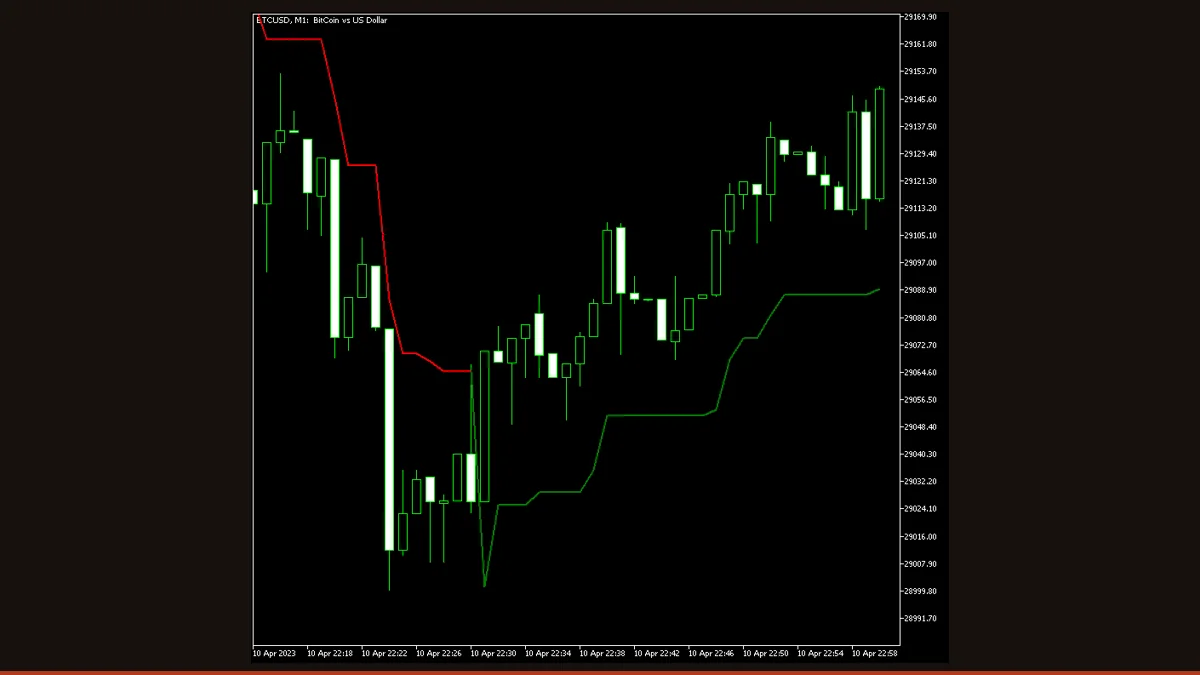
Supertrend is an ATR-based trend-following indicator that plots a single line below price in an uptrend and above price in a downtrend. The line flips color when price closes through it. Because it updates on closed bars, past flips stay fixed and do not repaint. Free for MT4 and MT5.
Supertrend is one of the most recognisable trend tools in retail trading because it answers a single question with a single line: is the market trending up or down right now? It overlays directly on your price chart, paints green when the trend is up and red when the trend is down, and gives you a moving stop level you can actually see.
This free build, originally coded by EarnForex.com and re-hosted here under its open licence, runs on both MetaTrader 4 and MetaTrader 5. It adds native, mobile-push, and email alerts on each colour flip, so you do not have to stare at the screen. Below you will find how the line is actually calculated, the settings that matter, and an honest look at where it helps and where it hurts.
What is the Supertrend indicator?
Supertrend is a trend-following overlay indicator that uses the Average True Range (ATR) to plot a single stair-step line that sits below price during uptrends and above price during downtrends. It is not an oscillator and it does not predict turns; it follows the trend that is already in motion and tells you which side of the market currently has control. When price closes on the other side of the line, the indicator flips its colour and its position, marking a change in trend direction.
It belongs to the same family as Parabolic SAR and the chandelier-stop concept: a volatility-scaled trailing line that doubles as a visual stop-loss. The version on this page draws one continuous line and switches its colour rather than printing two separate bands, which keeps the chart clean.
How does the Supertrend indicator work?
The calculation has two ingredients: a price midpoint and a volatility cushion.
First, the indicator measures volatility with the Average True Range over a chosen number of bars (the default here is an unusually long 100-period ATR). It then builds two basic bands around the bar's median price: an upper band at median + (ATR × multiplier) and a lower band at median − (ATR × multiplier). The default multiplier is 2.0, so the bands sit two ATRs away from price.
The trend rule is what makes Supertrend useful. While the market is in an uptrend, only the lower band is drawn, and it is only ever allowed to ratchet upward, never down, it trails price like a stop. The moment a bar closes below that lower band, the trend flips to down: the line jumps above price, turns red, and now trails downward. A close back above the line flips it green again. Because the flip is gated on a confirmed close rather than an intrabar touch, the line on every completed bar is final.
This is the key honesty point: on closed bars, Supertrend does not repaint, past flips stay exactly where they printed. The only value that moves is the line on the current, still-forming bar, which naturally updates with live price until that bar closes. That is normal recalculation, not retroactive repainting of history.
Supertrend settings and parameters
The two inputs that change behaviour the most are the ATR period and the ATR multiplier; the rest control alerts and drawing. Here is what each does in plain English.
| Parameter | Default | What it does |
|---|---|---|
| ATRMultiplier | 2.0 | How many ATRs the line sits away from price. Lower values (e.g. 1.5) hug price for earlier, more frequent flips; higher values (3.0+) widen the cushion, cutting whipsaws but flipping later. |
| ATRPeriod | 100 | How many bars the ATR averages. This default of 100 is long and produces a slow, smooth trend filter. Shorter periods (10-14, the classic Supertrend setting) react faster but flip more often. |
| ATRMaxBars | 1000 | Limits how many historical bars the indicator calculates. Lower it to speed up loading on slow machines or very long charts; raise it if you need the line drawn further back in history. |
| Shift | 0 | Horizontal offset of the drawn line in bars. Positive shifts it right (into the future), negative shifts it left. Leave at 0 unless you are aligning it visually with another tool. |
| TriggerCandle | Previous | Which candle confirms a flip and fires alerts. 'Previous' (the last fully closed bar) avoids acting on an unfinished candle; 'Current' reacts to the live bar but can change before it closes. |
| EnableNotify | false | Master switch for the notification system. Must be true before any of the alert channels below will actually fire on a colour flip. |
| SendAlert | false | Pops a native MetaTrader alert window on the terminal when the trend flips. The simplest way to get notified while you have the platform open. |
| SendApp | false | Sends a push notification to the MetaTrader mobile app on a flip. Requires your MetaQuotes ID configured in the terminal's notification settings. |
| SendEmail | false | Emails you on each flip. Requires a working SMTP email setup in the terminal's options before it can send. |
Pros and cons (the honest version)
What it does well
- One clean line that gives an instant, unambiguous read on trend direction with no extra interpretation needed.
- Does not repaint completed bars: flips are gated on a confirmed close, so historical signals stay fixed.
- ATR scaling adapts the cushion to current volatility, so it widens in fast markets and tightens in calm ones.
- The line doubles as a visible trailing stop, giving you a concrete exit level rather than just a signal.
- Built-in native, mobile-push, and email alerts on every flip, so you can step away from the screen.
- Runs natively on both MT4 and MT5, and works on any instrument and timeframe.
Where it falls short
- It lags. Because flips require a confirmed close two ATRs through the line, you give back part of the move on every turn.
- It whipsaws badly in ranging or sideways markets, producing a string of small losing flips with no real trend to catch.
- It is a lagging trend filter, not a predictor, it tells you the trend that already exists, never the one about to start.
- The line on the live, forming bar moves with price until that bar closes; do not treat the current bar's level as final.
- The shipped 100-period ATR default is very slow, many traders will want a shorter period for responsive signals.
- Used alone it has no profit edge; it needs a higher-timeframe filter or a momentum confirmation to be useful.
Download Supertrend free
Enter your email and we'll send you Supertrend for MT4, packaged with its original Apache-2.0 licence and author credit. Come back for any of our other free indicators whenever you want one.
We never share or sell your email. One-click unsubscribe in every message.
How to install Supertrend on MetaTrader 4
- Download the free Supertrend zip file from the link on this page.
- Extract the zip and locate the .mq4 file (use the .mq5 file if you are on MetaTrader 5).
- In MetaTrader, open File → Open Data Folder, then go into MQL4/Indicators (or MQL5/Indicators on MT5).
- Copy the indicator file into that Indicators folder.
- Restart MetaTrader, or right-click the Navigator panel and choose Refresh so the indicator appears.
- Drag Supertrend from the Navigator onto your chart.
- In the inputs tab, set the ATR period and multiplier to taste, enable alerts if you want them, and click OK.
Supertrend FAQ
Does the Supertrend indicator repaint?
No, not on closed bars. A flip is only confirmed when a candle closes through the line, so once a bar finishes its signal is locked and never moves. The only value that updates is the line on the current, still-forming candle, which naturally tracks live price until that bar closes, that is normal recalculation, not retroactive repainting of past history.
What is the best timeframe and setting for Supertrend?
There is no single best setting. The build here defaults to a slow 100-period ATR with a 2.0 multiplier, which suits H1 and higher for trend bias. For faster, more responsive signals on lower timeframes, many traders use the classic 10-period ATR with a 3.0 multiplier and test it on their own market before trading it.
Does Supertrend work on MT5 as well as MT4?
Yes. This version ships for both MetaTrader 4 and MetaTrader 5. Use the .mq4 file for MT4 and the .mq5 file for MT5, and place it in the matching Indicators folder. Inputs and behaviour are the same on both platforms.
Is this Supertrend indicator free?
Yes, it is completely free to download and use. It was coded by EarnForex.com and is shared here under its open licence, with no trial limit, no licence key, and no payment required.
Can I trade using Supertrend flips alone?
It is risky to. Supertrend is a lagging trend filter that whipsaws in ranges and has no edge on its own. Most traders use it for trend direction and trailing stops while confirming entries with a higher-timeframe bias, a momentum oscillator, or a support/resistance level, and always with defined risk.
Why does the line lag the actual turn?
By design. The line sits two ATRs away from price and only flips after a confirmed close through it, so it deliberately ignores small pullbacks to stay with the trend. That cushion is what filters noise, but it also means you give back part of the move on every genuine reversal.