QQE Indicator for MT4 (Quantitative Qualitative Estimation)
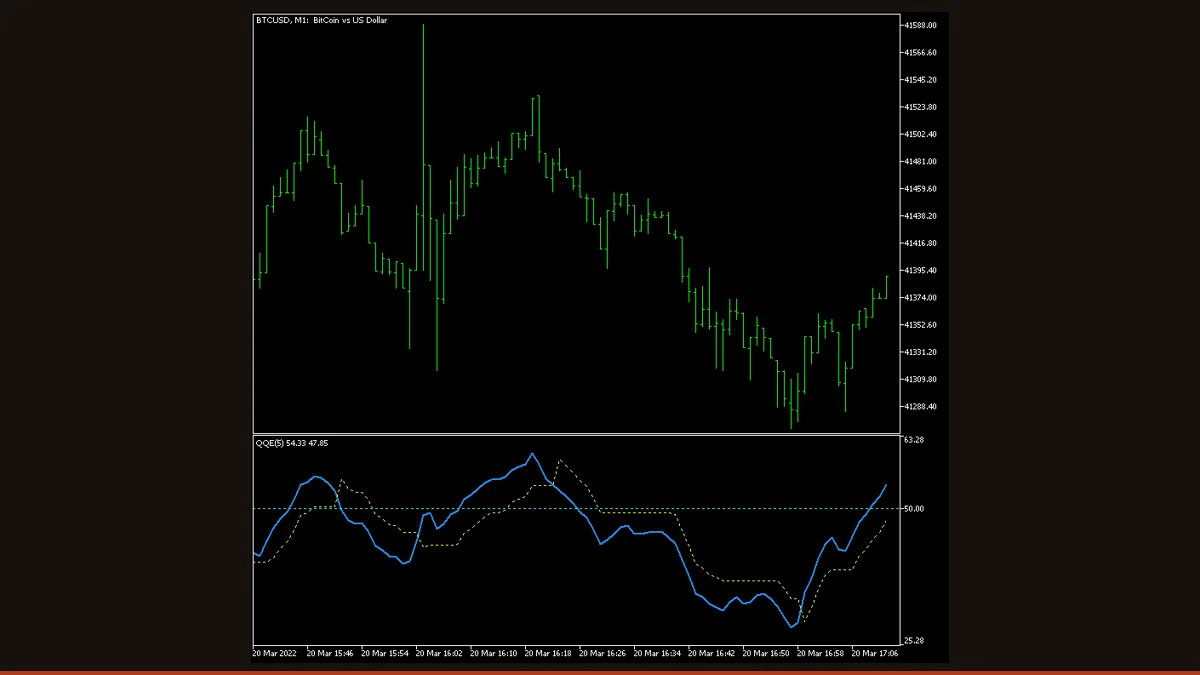
QQE (Quantitative Qualitative Estimation) is a momentum oscillator that smooths RSI with a Wilder EMA, then trails an ATR-based band around it. Buy/sell signals fire when the smoothed RSI crosses that band or the 50 line. It filters noise but still lags and can whipsaw in flat ranges.
QQE (Quantitative Qualitative Estimation) is one of the cleaner-looking momentum oscillators you can run on MT4, because it does two jobs at once: it smooths the jittery raw RSI line, and it wraps that smoothed line in a self-adjusting volatility band so you get fewer, more deliberate crossover signals. This free, license-clear MT4 version is the EarnForex build (Apache-2.0), descended from Roman Ignatov's and Tim Hyder's early QQE code, with optional arrows, alerts, and a multi-timeframe mode bolted on.
On this page we explain exactly how QQE is calculated, give you a plain-English settings table built from the real indicator inputs, and, just as importantly, tell you where it falls short, so you can decide whether it earns a slot on your chart.
What is the QQE (Quantitative Qualitative Estimation) indicator?
QQE is a momentum oscillator that takes a standard RSI, double-smooths it with a Wilder exponential moving average, and then plots a trailing band derived from the RSI's own volatility (an ATR-style measure of how much the RSI is moving). You read it like RSI, a single line oscillating around a 50 centerline, but the smoothing and the trailing band are designed to strip out the small, false flickers that make raw RSI noisy.
The name "Quantitative Qualitative Estimation" sounds grand, but the idea is practical: quantify momentum (RSI), then qualify it with a volatility-aware filter so that only meaningful moves through the band count as signals. The result is an indicator that behaves like a hybrid between an oscillator and a trend filter. It works on any symbol and timeframe in MetaTrader 4 (and this build also ships for MT5 and cTrader), and it is genuinely free with clear licensing, no nag screens, no locked features.
How does the QQE (Quantitative Qualitative Estimation) indicator work?
QQE is built in three layers, and understanding them tells you exactly what each signal means.
1. RSI, then smoothing. The indicator starts with a Relative Strength Index calculation. Raw RSI is twitchy, so QQE runs it through a Wilder exponential moving average controlled by the Smoothing Factor (SF). A higher SF produces a slower, calmer line; a lower SF keeps the line responsive but noisier. This smoothed RSI is the main line you watch.
2. The trailing ATR band. QQE then measures how fast the smoothed RSI is itself moving, essentially an ATR of the RSI line, and smooths that too. It uses this to build a dynamic band that trails the smoothed RSI from above and below, much like a Supertrend or Parabolic SAR trails price. When momentum accelerates, the band widens and sits further away; when momentum settles, the band tightens and creeps closer to the line. Because the band only ratchets in the direction of the move (it doesn't loosen against it), it acts as a momentum stop.
3. Signals. Two events generate the arrows and alerts in this build. First, a crossover: when the smoothed RSI crosses its own trailing band, momentum is judged to have flipped, and an up or down arrow prints. Second, a level cross: when the smoothed RSI crosses the neutral 50 line (the configurable Alert Level), it confirms a shift between bearish and bullish territory. Many traders treat a band crossover that's later confirmed by a 50-line cross as the stronger setup. The multi-timeframe option lets the indicator read QQE from a higher timeframe and project those signals onto your current chart.
QQE (Quantitative Qualitative Estimation) settings and parameters
These are the real inputs in the MT4 indicator. The Smoothing Factor is the only setting that changes the math; everything else controls alerts, arrows, and the multi-timeframe source.
| Parameter | Default | What it does |
|---|---|---|
| SF (Smoothing Factor) | 5 | The core tuning dial. Higher values smooth the RSI line more heavily, fewer, slower signals with less noise; lower values make it react faster but whipsaw more. This is the one input that actually changes how QQE is calculated. |
| AlertOnCrossover | false | Turns on a pop-up/alert when the smoothed RSI crosses its trailing band (a momentum flip). Leave off if you only want visual arrows. |
| AlertOnLevel | false | Fires an alert when the line crosses the neutral level. Pair with AlertLevel to be notified of bullish/bearish confirmations rather than every band cross. |
| AlertLevel | 50 | The centerline used for level signals. 50 is the standard neutral midpoint; raising or lowering it makes level signals stricter or looser. |
| ArrowsOnCrossover | true | Draws up/down arrows on the chart at each band crossover. The fastest, earliest signal QQE produces, and also the one most prone to false starts in chop. |
| ArrowsOnLevel | true | Draws arrows when the line crosses the neutral level. Slower than crossover arrows but usually cleaner, since a 50-line cross implies a more committed move. |
| NativeAlerts / EmailAlerts / NotificationAlerts | false | Delivery channels for any enabled alert: an in-terminal pop-up, an email, or a push notification to the MT4 mobile app. Turn on only the channel you'll actually watch. |
| UpperTimeframe | PERIOD_CURRENT | The multi-timeframe source. Leave at current to read QQE from the chart you're on, or pick a higher timeframe (e.g. H4 while trading M15) to filter your entries by the bigger-picture trend. |
Pros and cons (the honest version)
What it does well
- Smoother than raw RSI, the Wilder EMA plus trailing band strips out a lot of the small false flickers that clutter a plain RSI.
- Two distinct signal types (band crossover and 50-line cross) let you choose between earlier-but-noisier and later-but-cleaner entries.
- The ATR-style band self-adjusts to volatility, so it widens in fast markets and tightens in quiet ones without manual re-tuning.
- Multi-timeframe input lets you trade a lower chart while filtering by a higher-timeframe momentum read.
- Built-in arrows plus pop-up, email, and push alerts mean you don't have to stare at the screen.
- Genuinely free, Apache-2.0 licensed, and works on MT4, MT5, and cTrader, no locked features.
Where it falls short
- It lags. Smoothing RSI and trailing a band inevitably delays signals, you trade some early-entry edge for cleaner ones.
- It whipsaws in ranges. In a flat, directionless market the line crosses the band and the 50 level repeatedly, producing back-to-back false arrows.
- Signals on the forming (current) bar can move or disappear as that bar develops, since the calculation updates tick by tick until the bar closes, only signals on closed bars are final.
- The multi-timeframe mode reads a higher timeframe whose last bar is still forming, so MTF arrows can shift until that higher bar closes.
- It's still RSI underneath, so it shares RSI's weaknesses: it can sit overbought or oversold for a long time during strong trends and read a 'reversal' that never comes.
- Only one input (SF) changes the behavior; you can't deeply customize the RSI period or band logic from the inputs without editing the code.
Download QQE (Quantitative Qualitative Estimation) free
Enter your email and we'll send you QQE (Quantitative Qualitative Estimation) for MT4, packaged with its original Apache-2.0 licence and author credit. Come back for any of our other free indicators whenever you want one.
We never share or sell your email. One-click unsubscribe in every message.
How to install QQE (Quantitative Qualitative Estimation) on MetaTrader 4
- Download the QQE zip file from this page.
- Unzip it and locate the .mq4 file inside.
- In MT4, open File → Open Data Folder, then go to MQL4 → Indicators.
- Copy the .mq4 file into that Indicators folder.
- Restart MetaTrader 4, or right-click the Navigator panel and choose Refresh.
- Expand Navigator → Indicators, then drag QQE onto your chart.
- In the inputs tab, set your Smoothing Factor and toggle the arrows/alerts you want, then click OK.
QQE (Quantitative Qualitative Estimation) FAQ
Does the QQE (Quantitative Qualitative Estimation) indicator repaint?
QQE does not repaint closed-bar history, once a bar closes, its signal is locked. However, like most oscillators, the value and any arrow on the current forming bar can move or vanish until that bar closes, because the calculation updates with every tick. In multi-timeframe mode the higher-timeframe signal can also shift until that higher bar finalizes. Wait for the bar to close before treating a signal as confirmed.
What is the best timeframe for QQE?
M15 to H4 generally give the best balance. Below M5 the band crossovers whipsaw too often to trade cleanly; H4 and daily produce slower, steadier momentum reads better suited to swing trading. A common setup is trading one timeframe while setting UpperTimeframe one or two steps higher as a filter.
Is the QQE indicator free?
Yes. This build is fully free and Apache-2.0 licensed, with no locked features, trial limits, or nag screens. You can use and even modify the code. Download it from this page.
Does QQE work on MT5?
Yes. While this page covers the MT4 version, the same QQE build ships for MetaTrader 5 and cTrader as well, so you can run it on whichever platform you trade.
What does the Smoothing Factor (SF) actually do?
SF controls how heavily the RSI line is smoothed. The default is 5. Raising it produces a slower, calmer line with fewer signals and less noise; lowering it makes QQE more responsive but more prone to whipsaws. It's the only input that changes the underlying calculation.
How should I trade QQE signals?
Treat the 50-line cross as a trend-bias filter and the band crossover as a timing trigger, ideally in agreement. Use QQE for confirmation alongside price structure or a higher-timeframe trend tool rather than trading every arrow in isolation, since it whipsaws in ranges. Always wait for the signal bar to close.