Pin Bar Detector Indicator for MT4 (Free Download)
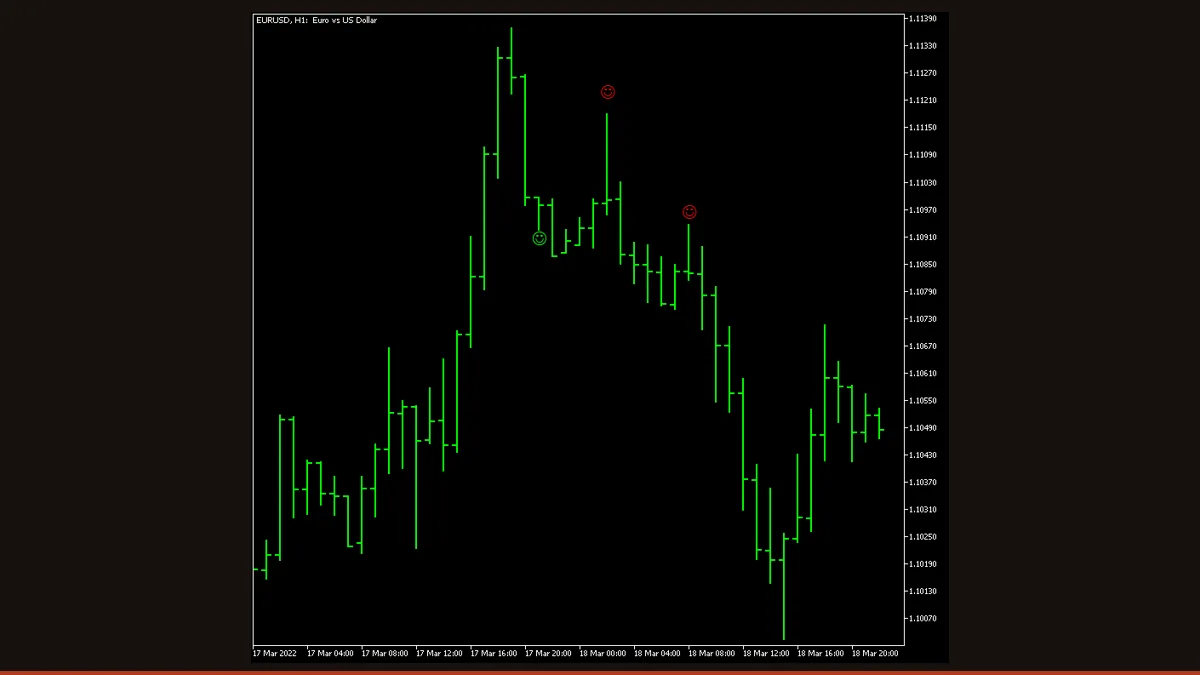
The Pin Bar Detector is a free MT4/MT5 indicator that scans candles and marks completed pin-bar reversal patterns with green (bullish) and red (bearish) smiley faces. It evaluates wick-to-body ratio and body position against tunable thresholds, only confirms on closed bars, and can fire chart, email, or push alerts.
If you trade price action, you already know the pin bar is one of the most-watched single-candle reversal signals, a long wick that pokes through a level and then rejects it. The hard part is spotting clean ones across multiple pairs and timeframes without staring at charts all day. The Pin Bar Detector does that scanning for you, marking every candle that meets a strict set of geometric rules with a green or red face right on the chart.
It was built by EarnForex and is released under the Apache 2.0 license, so it is genuinely free to download, use, and modify. Below we explain exactly how it decides what counts as a pin bar, what each meaningful setting does, and where it helps versus where it can mislead you.
What is the Pin Bar Detector indicator?
The Pin Bar Detector is a free, open-source MetaTrader indicator that automatically identifies pin-bar (also called Pinocchio bar) candlestick reversal patterns and labels them on your chart. A green smiley face marks a bullish pin bar (a long lower wick rejecting lower prices); a red face marks a bearish pin bar (a long upper wick rejecting higher prices). It is a pure price-action tool, it reads only candle geometry, not a moving average or oscillator, and it runs on both MT4 and MT5.
How does the Pin Bar Detector indicator work?
A pin bar is defined by its shape, and this indicator turns that shape into measurable rules. It uses a memorable three-part vocabulary: the nose is the candle with the long protruding wick (the pin itself), and the left eye is the candle immediately before it. The detector evaluates the nose, the left eye, and the relationship between them.
For each candidate, it checks several geometric conditions against thresholds you can adjust:
- Body must be small. The nose's body is divided by its total high-to-low range. If that ratio exceeds CustomMaxNoseBodySize (default 0.33), the candle is too "fat" to be a pin bar and is rejected.
- Body must sit at the right end. The body must cluster in the top or bottom portion of the candle, CustomNoseBodyPosition (default 0.4) means it must fall within the outer 40%, leaving a dominant wick on the opposite side.
- The wick must protrude. The long wick has to stick out beyond the surrounding price structure by at least CustomNoseProtruding of the candle's length (default 0.5, i.e. half), confirming a real rejection rather than a candle buried inside a range.
- The prior bar (left eye) should agree. By default the left-eye candle should point opposite to the pattern, supporting the reversal narrative, and there are size and depth ratios that compare the nose to the left eye.
- Minimum size filter. CustomMinimumNoseLength rejects tiny noise candles whose total length is below a points threshold.
When every active condition passes, the indicator draws the face. Crucially, it makes that decision on closed candles: the pattern is judged once a bar has fully formed, so a face that has appeared does not vanish or jump to a different bar later. That is why it can honestly be called non-repainting, the historical signals you see are the signals it actually generated. The trade-off is built into price action itself: confirmation arrives only after the candle closes, so you are reading the signal one bar after the wick printed, not in real time mid-candle.
Pin Bar Detector settings and parameters
Out of the box the indicator uses sensible built-in thresholds; set UseCustomSettings to true to unlock the geometry parameters below and tune how strict the detector is. Tighter ratios mean fewer, cleaner signals; looser ratios mean more signals with more false positives.
| Parameter | Default | What it does |
|---|---|---|
| CountBars | 0 | How many historical bars to scan. 0 means the entire chart history; set a number (e.g. 500) to speed up loading on long charts. |
| DisplayDistance | 5 | Vertical gap between the smiley-face markers and the candles. Increase it if the faces overlap your price bars. |
| UseCustomSettings | false | Master switch. Leave false to use the built-in defaults; set true to apply all the custom geometry thresholds below. |
| CustomMaxNoseBodySize | 0.33 | Largest allowed body-to-range ratio for the pin candle. Lower it (e.g. 0.25) to demand a smaller body and a more classic pin; raise it to catch chunkier candles. |
| CustomNoseBodyPosition | 0.4 | How far toward one end the body must sit. Lower values force the body harder into the top/bottom, leaving a longer, purer rejection wick. |
| CustomNoseProtruding | 0.5 | Minimum share of the candle's length the wick must stick out beyond surrounding structure. Higher values demand a more obvious rejection. |
| CustomLeftEyeOppositeDirection | true | When true, the bar before the pin must close in the opposite direction of the reversal, reinforcing the turn. Turn off to be more permissive. |
| CustomLeftEyeMinBodySize | 0.1 | Minimum body-to-range ratio for the prior (left-eye) candle, so the setup candle is not itself a doji. |
| CustomMinimumNoseLength | 1 | Smallest pin-candle length in points. Raise it to filter out tiny low-volatility candles that produce noise, especially on lower timeframes. |
| UseAlerts | true | Pops an on-screen/sound alert when a new pin bar is confirmed on the close of a bar. |
| UseEmailAlerts | false | Emails you on each new signal (requires SMTP set up in MT4 Tools > Options > Email). |
Pros and cons (the honest version)
What it does well
- Free and open-source under Apache 2.0, download, use, and modify with no license worries.
- Confirms only on closed bars, so historical markers do not repaint or shift after the fact.
- Highly tunable geometry (wick ratio, body position, protrusion, prior-bar agreement) lets you tighten the filter to your own definition of a clean pin.
- Built-in alerts, on-screen, email, and push notification, so you can monitor several charts without watching them.
- Pure price action with no lag from averaging; works on any pair, metal, index, or crypto symbol your broker offers.
- Runs on both MT4 and MT5.
Where it falls short
- Detection is candle-only: it does not know whether the pin formed at a meaningful support/resistance level, so many flagged pins occur mid-range where they mean little.
- Signal arrives on the bar close after the wick, so you are always acting one candle late by design.
- Lower timeframes (M1-M15) generate frequent low-quality signals; the noise filter helps but does not eliminate this.
- It is a detector, not a strategy, it gives no entry, stop, or target, and provides no confirmation of follow-through.
- Loose threshold settings can flood the chart with marginal patterns; over-tightening can hide valid ones. Some tuning per symbol and timeframe is expected.
- Like any reversal signal, it produces false positives in strong trends where price keeps rejecting against you.
Download Pin Bar Detector free
Enter your email and we'll send you Pin Bar Detector for MT4, packaged with its original Apache-2.0 licence and author credit. Come back for any of our other free indicators whenever you want one.
We never share or sell your email. One-click unsubscribe in every message.
How to install Pin Bar Detector on MetaTrader 4
- Download the free Pin Bar Detector zip from this page.
- Extract the zip; locate the .mq4 file (use the .mq5 file if you are on MT5).
- In MetaTrader open File > Open Data Folder, then go to MQL4 > Indicators (MQL5 > Indicators on MT5).
- Copy the .mq4 file into that Indicators folder.
- Restart MetaTrader, or right-click the Navigator panel and choose Refresh.
- Drag "Pinbar Detector" from Navigator > Indicators onto a chart.
- In the Inputs tab adjust the thresholds (or set UseCustomSettings to true to tune them), enable the alerts you want, and click OK.
Pin Bar Detector FAQ
Does the Pin Bar Detector repaint?
No. It evaluates each candle only after that bar has closed, so a face that has been drawn stays on that bar and does not move or disappear. The signals you see in history are the ones it actually produced. The flip side is that confirmation comes on the bar after the wick prints, that is normal for closed-bar price-action tools, not a defect.
What timeframe works best?
H1, H4, and the Daily chart give the cleanest, most meaningful pin bars. On M1-M15 you will get many more signals but a lot of them are noise; raise CustomMinimumNoseLength and tighten the body and protrusion ratios to filter those out.
Is it really free?
Yes. It is open-source under the Apache 2.0 license, so you can download, use, share, and modify it at no cost. There is no trial, paywall, or account requirement to run it.
Does it work on MT5?
Yes. The package includes both an MT4 (.mq4) and an MT5 (.mq5) version; install the one that matches your platform into its Indicators folder.
Will it tell me when to enter, place a stop, or take profit?
No. It only detects and marks the pattern. Treat a face as an alert to look closer, confirm it lines up with a support/resistance level or trend context, then apply your own entry, stop, and target rules.
Why didn't it mark a candle that looks like a pin bar to me?
Your eye and the math can disagree. The candle likely failed one threshold, its body was too large, the body sat too far from the end, the wick did not protrude enough, or the prior bar pointed the wrong way. Enable UseCustomSettings and loosen the relevant ratio if you want it to flag those.