CCI Arrows Indicator for MT4
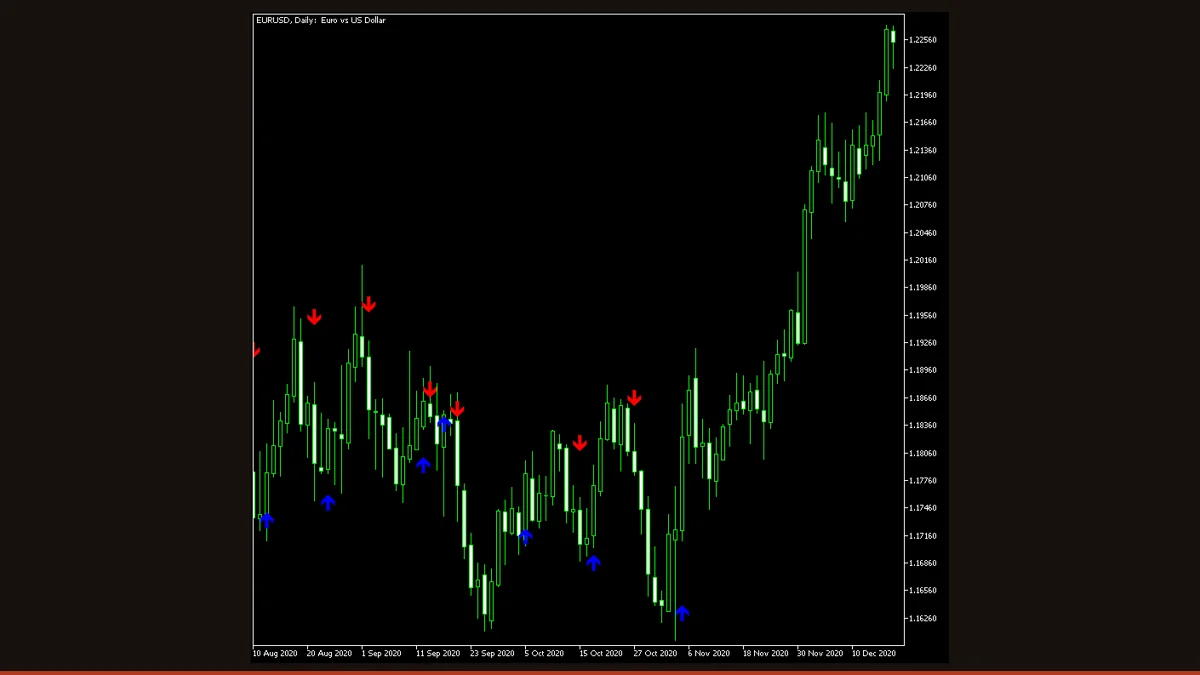
CCI Arrows is a free MT4 and MT5 indicator that watches the Commodity Channel Index and draws an up arrow when CCI crosses above zero and a down arrow when it crosses below. Arrows print on the price chart, not a sub-window, and it can fire native, email, and push alerts. It does not repaint, but it lags.
CCI Arrows takes one of the oldest momentum oscillators in technical analysis, the Commodity Channel Index, and strips away the sub-window squiggle most traders ignore. Instead of asking you to watch a line cross zero in a separate panel, it plots a simple up or down arrow directly on your candles the moment that cross happens. The idea is to turn a momentum reading into a glanceable, chart-anchored signal you can act on without splitting your attention.
This is the original open-source build from EarnForex, released under a permissive license, and it runs on both MT4 and MT5. It is honest, minimal code: no hidden martingale, no curve-fit "secret" logic, just CCI, a zero-line cross, an arrow, and an optional alert. Below you'll find exactly how the signal is calculated, every input that matters, and the real limitations you should know before you trade it.
What is the CCI Arrows indicator?
CCI Arrows is a signal-overlay indicator that monitors the Commodity Channel Index (CCI) and marks every zero-line crossing with an arrow on the main price chart. When CCI rises from negative territory through zero, it prints a green up arrow under the candle; when CCI falls from positive territory through zero, it prints a red down arrow above the candle.
The standard CCI normally lives in a separate indicator window and measures how far price has strayed from its statistical average. CCI Arrows reuses that exact math but discards the oscillating line, keeping only the two events that most traders care about, the upward and downward zero crosses, and projecting them onto the candles themselves. It also bundles three alert channels (on-screen pop-up, email, and mobile push) so you can be notified the instant a fresh cross confirms.
How does the CCI Arrows indicator work?
The engine is plain CCI. For each bar the indicator computes the Commodity Channel Index over CCI_Period bars using the classic formula: it takes the typical price (high + low + close, divided by three), finds the simple moving average of that typical price, measures the mean absolute deviation around it, and divides the gap between current typical price and its average by 0.015 times that deviation. The 0.015 constant scales the output so that, historically, CCI spends most of its time roughly between −100 and +100.
CCI Arrows ignores the ±100 overbought/oversold bands entirely. It cares about one thing: the zero line. Zero is the point where price equals its own moving average, in other words, the dividing line between bullish and bearish momentum. Each bar the indicator compares the current CCI value to the previous one:
• If CCI was at or below zero and has now crossed above zero, momentum has flipped bullish, it draws an up arrow.
• If CCI was at or above zero and has now crossed below zero, momentum has flipped bearish, it draws a down arrow.
Crucially, by default the cross is evaluated on the previous (closed) candle, controlled by the TriggerCandle input. Because the source bar is already finished, the arrow does not move once it is drawn, the indicator does not repaint. The trade-off is lag: a moving-average-based oscillator like CCI has to accumulate enough new bars before it swings through zero, so an arrow often appears several candles after the actual turning point. This is inherent to the CCI family, not a bug, and it is the single most important thing to understand about this tool.
CCI Arrows settings and parameters
CCI Arrows keeps its inputs deliberately short. The two that change signal behaviour are the period and the trigger candle; the three alert toggles simply decide how you're notified.
| Parameter | Default | What it does |
|---|---|---|
| CCI_Period | 14 | Number of bars used to calculate the CCI. Lower values (e.g. 9) make the oscillator twitchier, so arrows appear earlier but more often, with more false flips in choppy markets. Higher values (e.g. 20-50) smooth the reading, producing fewer, slower, more reliable arrows. This is the main knob for the speed-versus-noise trade-off. |
| TriggerCandle | Previous | Which candle is checked for the zero cross. 'Previous' (the default) reads the last fully closed bar, so arrows are fixed and the indicator does not repaint. 'Current' reads the still-forming bar, which gives an earlier signal but lets the arrow appear, move, or vanish until that candle closes. |
| EnableNativeAlerts | false | Turns on the MT4/MT5 on-screen pop-up sound alert each time a new arrow forms. Set true if you watch the platform and want an audible nudge when momentum flips. |
| EnableEmailAlerts | false | Sends an email when a new arrow prints. Requires a working SMTP setup in the platform's Email options (Tools > Options > Email) or it does nothing. |
| EnablePushAlerts | false | Pushes a notification to the MetaTrader mobile app on a new arrow. You must enter your MetaQuotes ID under Tools > Options > Notifications for this to reach your phone. |
Pros and cons (the honest version)
What it does well
- Free and open-source under a permissive license, so you can read and modify the code.
- Runs on both MT4 and MT5 from the same project.
- Does not repaint when TriggerCandle is left on 'Previous' (default) because it reads only closed bars.
- Plots arrows on the price chart itself, so you don't have to split focus with a sub-window.
- Built-in pop-up, email, and push alerts mean you can step away and still get notified.
- Single meaningful input (CCI period) makes it quick to tune and hard to over-optimise.
Where it falls short
- It lags noticeably. CCI is a moving-average-based oscillator, so zero crosses often confirm several bars after the real turn, giving back early profit.
- Zero-line crosses whipsaw badly in ranging, sideways markets, firing alternating arrows that lose money in chop.
- It signals direction only, no stop-loss, take-profit, or trade management of any kind.
- A single oscillator has no trend filter, so up arrows appear inside downtrends and vice-versa.
- Setting TriggerCandle to 'Current' removes the non-repaint behaviour, which can mislead anyone who flips it without realising.
- Like any momentum tool, it works best as confirmation, not as a standalone trading system.
Download CCI Arrows free
Enter your email and we'll send you CCI Arrows for MT4, packaged with its original Apache-2.0 licence and author credit. Come back for any of our other free indicators whenever you want one.
We never share or sell your email. One-click unsubscribe in every message.
How to install CCI Arrows on MetaTrader 4
- Download the CCI Arrows zip file from the link on this page.
- Unzip it and locate the .mq4 file (use the .mq5 file if you're on MetaTrader 5).
- In MetaTrader, open File > Open Data Folder, then go to MQL4 > Indicators (or MQL5 > Indicators on MT5).
- Copy the indicator file into that Indicators folder.
- Restart MetaTrader, or right-click the Navigator panel and choose Refresh.
- Drag 'CCI Arrows' from the Navigator onto the chart you want to monitor.
- In the inputs tab, set your CCI_Period, confirm TriggerCandle is 'Previous' for non-repainting arrows, enable any alerts you want, and click OK.
CCI Arrows FAQ
Does CCI Arrows repaint?
Not with its default settings. With TriggerCandle set to 'Previous', the indicator evaluates the zero cross only on fully closed bars, so an arrow never moves or disappears once drawn. If you switch TriggerCandle to 'Current', it reads the forming candle and the latest arrow can change until that bar closes, that mode does effectively repaint, so leave it on 'Previous' if you want fixed signals.
Why do the arrows appear late?
Because CCI is built on a moving average, and averages lag price by design. The oscillator has to absorb several new bars before it swings through zero, so the arrow confirms after the turn rather than at it. This lag is inherent to the whole CCI family and is the main thing to account for when you trade these signals.
What is the best timeframe for CCI Arrows?
H1 and higher generally give the cleanest results because larger bars filter out noise and produce fewer false zero crosses. Lower timeframes like M5 work but whipsaw heavily in ranges; if you trade them, increase CCI_Period to slow the signal and pair it with a trend filter.
Does it work on MT5 as well as MT4?
Yes. The project ships both an MT4 (.mq4) and an MT5 (.mq5) version with identical logic. Install the file that matches your platform into the corresponding Indicators folder.
Is CCI Arrows free?
Yes, completely. It is open-source and released under a permissive license, so there is no cost, no trial limit, and you are free to inspect or modify the code.
Can I use it as a complete trading system on its own?
No, and it isn't built to be. CCI Arrows gives direction only, it has no stop-loss, target, or trade management, and a single oscillator has no trend filter. Use it as momentum confirmation alongside structure, a higher-timeframe bias, or a trend indicator, and apply your own risk management.