Bollinger Squeeze Indicator for MT4 (Free Download)
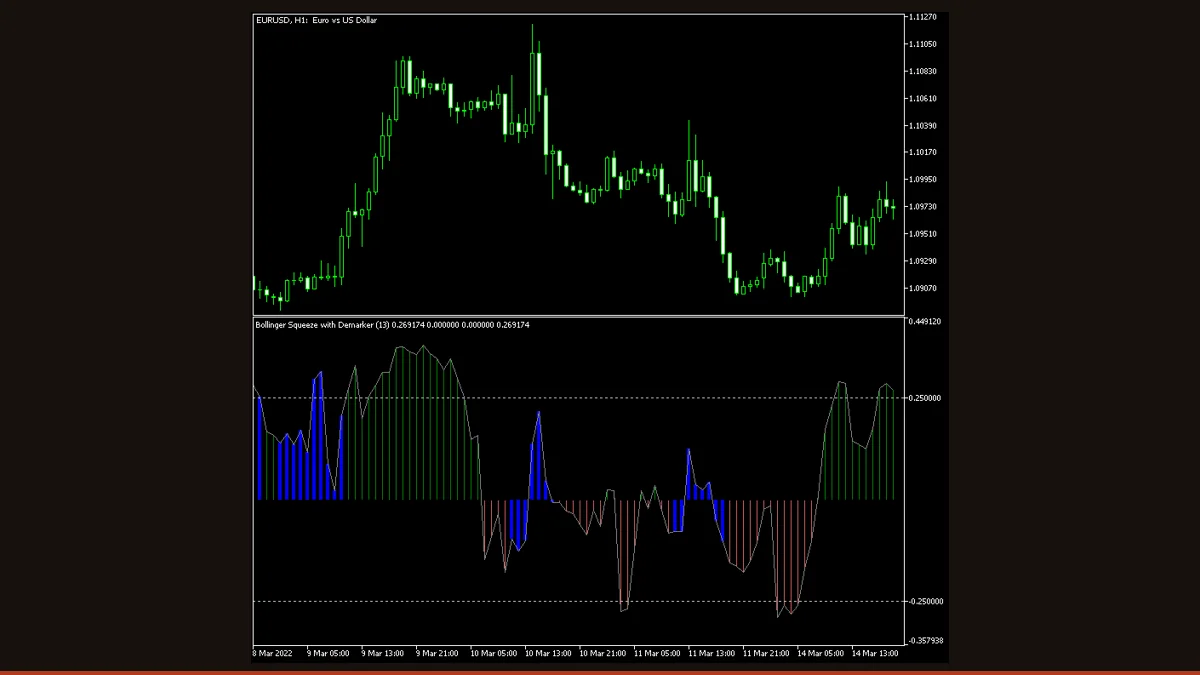
The Bollinger Squeeze is a histogram that detects when volatility contracts, when Bollinger Bands pinch inside the Keltner Channel, then signals the breakout direction using a chosen oscillator. This free MT4/MT5 build offers eight trigger oscillators, two alert types, and, set to the Previous candle, reads only closed bars.
Markets do not trend all the time. They spend long stretches coiling in tight ranges, and the hardest part of breakout trading is knowing when one of those quiet ranges is genuinely loaded and about to release. The Bollinger Squeeze was built for exactly that question: it measures when volatility has been wrung out of the market, so you stop guessing and start waiting for the spring to uncoil.
This is the free EarnForex build, the "Advanced" version originally coded by Nick Bilak, distributed under an Apache-2.0 license. There are no trial timers, no locked features, and no paywall. It runs on both MT4 and MT5, plots as a clean histogram in a sub-window beneath your chart, and lets you pick from eight different oscillators to decide which way the breakout is leaning.
What is the Bollinger Squeeze indicator?
The Bollinger Squeeze is a volatility indicator that compares the width of the Bollinger Bands to the width of the Keltner Channel to tell you when the market is compressed and primed for a breakout. When the Bollinger Bands shrink inside the Keltner Channel, volatility has collapsed, that is the "squeeze." When the bands expand back outside the channel, the squeeze has fired and a directional move is usually underway.
The squeeze concept was popularised by John Carter, who paired the two volatility envelopes against each other. This "Advanced" MetaTrader version adds a second layer on top: instead of relying on a single momentum reading to call the breakout direction, it lets you choose one of eight oscillators, DeMarker, Stochastic, CCI, RSI, MACD, Momentum, Williams %R, or ADX, as the trigger that colours and directs the histogram. The result is a single sub-window panel that answers two separate questions at once: is volatility coiled, and which way is pressure building.
How does the Bollinger Squeeze indicator work?
There are two independent engines running inside this indicator, and understanding the split is the key to reading it correctly.
1. The squeeze detector (the volatility part). The indicator calculates two envelopes around price: the Bollinger Bands, whose width is driven by standard deviation, and the Keltner Channel, whose width is driven by average range. It then compares the two. When the Bollinger Bands contract so far that they sit entirely inside the Keltner Channel, volatility is unusually low and the market is in a squeeze. When the Bollinger Bands push back outside the channel, the squeeze has released. This is the engine behind the first alert type, a change in the relationship between the bands and the channel, signalling a shift between a sideways and a trending market.
2. The direction trigger (the momentum part). The actual histogram you see is built from whichever oscillator you select in TriggerType (DeMarker by default). The histogram rises and falls around a central zero line according to that oscillator's reading. A bar above zero leans bullish; a bar below zero leans bearish. The second alert type fires when the histogram crosses the zero line, which is the indicator's way of flagging a change in trend direction.
Put together, the workflow is: wait for the squeeze detector to show that volatility has compressed, then watch the histogram for a zero-line cross to call the direction as the move breaks out. Because you can swap the trigger oscillator, the same indicator can behave like a fast Stochastic-driven signal or a slower ADX-driven trend filter depending on what you select. One practical detail matters a great deal here: the TriggerCandle input decides whether the histogram reads the current forming candle or the previous closed one. Left on its default of Previous, the signal is evaluated only on closed bars, so the printed history does not redraw, a far more honest read than evaluating the live, still-moving candle.
Bollinger Squeeze settings and parameters
This build exposes a long input list because each of the eight trigger oscillators has its own period setting. You only need to tune the inputs for the oscillator you actually select. Here are the controls that change behaviour most.
| Parameter | Default | What it does |
|---|---|---|
| TriggerType | DeMarker | Chooses which of the eight oscillators drives the histogram and the direction signal, DeMarker, Stochastic, CCI, RSI, MACD, Momentum, Williams %R, or ADX. This is the single most important input: it completely changes how fast and how sensitive the signals are. |
| TriggerCandle | Previous | Whether signals are read from the Previous (closed) candle or the Current (forming) one. Keep it on Previous for non-redrawing signals you can trust; switching to Current makes the latest histogram bar update on every tick until the candle closes. |
| InpTimeframe | PERIOD_CURRENT | Lets the indicator read data from a higher timeframe than the chart it sits on. Leave at current to match the chart, or set a higher period to build a multi-timeframe squeeze read on a lower-timeframe chart. |
| StochasticPeriod | 14 | Lookback for the Stochastic trigger. Only relevant when TriggerType is Stochastic. Shorter periods react faster and flip the histogram sooner; longer periods smooth it and cut false zero-line crosses. |
| RSIPeriod | 14 | Lookback for the RSI trigger. Lower values make the histogram twitchier around the zero line; higher values produce steadier, slower direction calls. Active only when TriggerType is RSI. |
| CCIPeriod | 50 | Lookback for the CCI trigger. The relatively long default makes CCI a calmer, slower direction signal than the other oscillators. Active only when TriggerType is CCI. |
| MACDFastEMAPeriod | 12 | Fast EMA length for the MACD trigger. Together with the slow EMA it sets how reactive the MACD-driven histogram is. Smaller gaps between fast and slow react quicker but whipsaw more. Active only when TriggerType is MACD. |
| ADXPeriod | 14 | Lookback for the ADX trigger. Because ADX measures trend strength rather than raw momentum, using it as the trigger turns the histogram into more of a trend-confirmation filter. Active only when TriggerType is ADX. |
| DeMarkerPeriod | 13 | Lookback for the default DeMarker trigger. Controls how sensitive the out-of-the-box histogram is, lower values flag direction changes earlier at the cost of more noise. Active only when TriggerType is DeMarker. |
Pros and cons (the honest version)
What it does well
- Genuinely free and license-clear (Apache-2.0), no trial limits, locked inputs, or paywalls.
- Runs natively on both MT4 and MT5 from the same project.
- Answers two questions in one panel: is volatility squeezed, and which way is the breakout leaning.
- Eight selectable trigger oscillators let you tune the direction signal from fast (Stochastic) to slow (ADX, CCI) without swapping indicators.
- Set to the Previous candle, signals are evaluated only on closed bars, so the histogram history does not redraw, backtests and visual reviews stay honest.
- Two built-in alert types (band/channel relationship change and zero-line cross) mean you do not have to watch the screen all day.
- Optional higher-timeframe input lets you read a slower squeeze while trading a faster chart.
Where it falls short
- The squeeze tells you a move is coming, not which direction, and the squeeze can fire either way, so a confident breakout signal can still reverse.
- Momentum oscillators lag by nature. The zero-line cross that calls direction arrives after price has already begun moving, not before.
- If you switch TriggerCandle to Current, the latest histogram bar recalculates on every tick until the candle closes, so a live signal can appear and then vanish, treat only closed-bar signals as final.
- False squeezes happen: bands can pinch inside the channel, fire, and produce a small fakeout instead of a clean trend, especially around news or session opens.
- The long input list is intimidating at first, most of the period settings only apply to one of the eight oscillators, and tuning the wrong one does nothing.
- It is a histogram in a sub-window, not arrows on price, so you still have to read the signal and combine it with structure; in isolation it has no edge.
- Different trigger oscillators can disagree, so results are sensitive to which one you pick, there is no single "correct" setting, and it must be tested on your own market.
Download Bollinger Squeeze free
Enter your email and we'll send you Bollinger Squeeze for MT4, packaged with its original Apache-2.0 licence and author credit. Come back for any of our other free indicators whenever you want one.
We never share or sell your email. One-click unsubscribe in every message.
How to install Bollinger Squeeze on MetaTrader 4
- Download the free Bollinger Squeeze Advanced zip from this page.
- Unzip it and locate the .mq4 file (and the .mq5 if you use MT5).
- In MetaTrader, open File then Open Data Folder, and navigate to MQL4/Indicators (or MQL5/Indicators on MT5).
- Copy the indicator file into that Indicators folder.
- Restart MetaTrader, or right-click Navigator and choose Refresh so the indicator appears.
- Drag Bollinger Squeeze Advanced from the Navigator onto your chart, it opens a histogram in a sub-window below price.
- In the inputs tab, choose your TriggerType oscillator, keep TriggerCandle on Previous, set the matching period, and click OK.
Bollinger Squeeze FAQ
Does the Bollinger Squeeze indicator repaint?
It depends on one setting. With TriggerCandle on its default of Previous, signals are read only from the most recent closed candle, so the printed histogram does not redraw and past signals stay fixed. If you change TriggerCandle to Current, the latest bar recalculates with every tick until that candle closes, which means a live signal can shift or disappear. For non-redrawing behaviour, leave it on Previous and wait for the candle to close.
What is a Bollinger Band squeeze and how do I read it?
A squeeze is when the Bollinger Bands contract so tightly that they sit inside the Keltner Channel, meaning volatility has dropped to an unusually low level. Low volatility tends to be followed by high volatility, so a squeeze is read as a warning that a breakout is building. You wait for the squeeze to release, the bands pushing back outside the channel, and then use the histogram's zero-line cross to judge which way the move is breaking.
Which trigger oscillator should I use?
There is no single best choice, that is the point of having eight. DeMarker (the default) and RSI give balanced, general-purpose signals. Stochastic reacts fastest and suits quick scalps but whipsaws more. CCI and ADX are slower and steadier, turning the histogram into more of a trend filter. Pick one, test it on your pair and timeframe, and avoid constantly switching, which only curve-fits to the past.
What is the best timeframe for the Bollinger Squeeze?
H1 and H4 are the most practical for forex, because squeezes take enough bars to form to be meaningful and the resulting breakouts have room to run. The Daily chart works well for swing traders. M1 and M5 produce constant squeezes with a high fakeout rate, so if you trade them you need extra confirmation and very disciplined stops.
Is this Bollinger Squeeze indicator really free?
Yes. It is distributed under an Apache-2.0 open-source license, so it is free to download and use with no trial period, no locked features, and no payment. You only provide an email to access the download.
Does it work on MT5 as well as MT4?
Yes. The download includes both a .mq4 file for MetaTrader 4 and a .mq5 file for MetaTrader 5, and both build the same squeeze histogram with the same eight trigger oscillators and two alert types.