Keltner Channel Indicator for MT4 (Free Download)
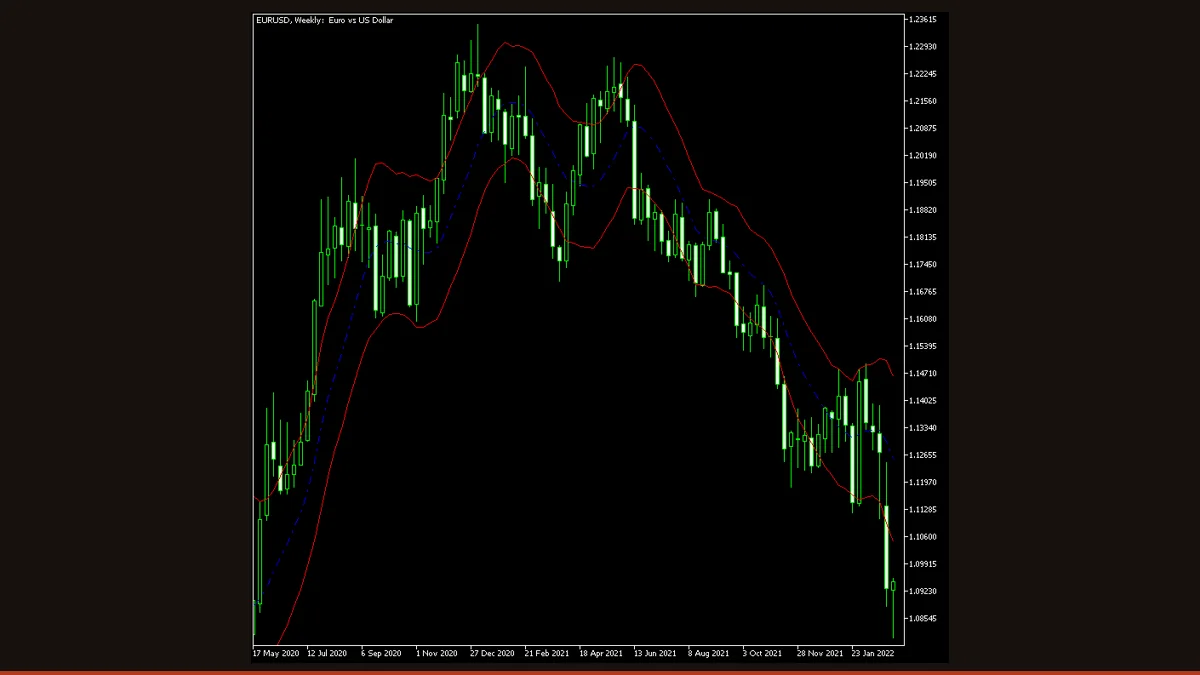
The Keltner Channel is a volatility envelope: a moving average in the middle, with an upper and lower band offset by the average bar range. Traders read pullbacks to the middle line and closes beyond the bands as trend or breakout signals. This MT4/MT5 build is free, license-clear, and updates only on closed bars.
If you trade trends or breakouts and want a cleaner read than raw price gives you, the Keltner Channel is one of the most practical envelopes on the chart. It wraps a moving average in two volatility-scaled bands so you can instantly see when price is stretched, when it is coiling, and when a candle has genuinely pushed through resistance versus just poking at it.
This is the free EarnForex build for MetaTrader, distributed under an Apache-2.0 license, so there are no strings, no trial timers, and no locked features. It runs on both MT4 and MT5, plots three lines directly on your price chart, and keeps the input list deliberately short so there is very little to misconfigure.
What is the Keltner Channel indicator?
The Keltner Channel is a volatility-based envelope indicator that draws three lines on the price chart: a central moving average and two outer bands set an equal distance above and below it. Unlike Bollinger Bands, which use standard deviation, the Keltner Channel sizes its bands from the average range of recent candles, which makes the channel walls smoother and less jumpy.
It was first described by Chester W. Keltner in the 1960s, and the core idea has barely changed since: a trend-following midline framed by adaptive volatility rails. When price rides the upper rail, momentum is up; when it hugs the lower rail, momentum is down; and when the bands pinch together, the market is quiet and often setting up for an expansion. This particular MetaTrader version stays faithful to the original construction rather than the later ATR-multiplier variants, so the band offset comes straight from the average of recent bar ranges.
How does the Keltner Channel indicator work?
The math behind this build is refreshingly transparent. Three things are calculated for every bar:
1. The middle line is a moving average of the typical price (high + low + close, divided by three) over the chosen lookback period. By default that is a 10-period simple moving average, but you can switch the averaging method and the price source.
2. The band offset is the simple average of the candle ranges (high minus low) over the same lookback period. In other words, the indicator measures how big the recent candles have been and uses that as the channel half-width.
3. The upper and lower bands are then drawn by adding that average range to the middle line and subtracting it from the middle line. So Upper = MA + average range, and Lower = MA − average range.
The practical effect is an envelope that automatically widens when candles get large and tightens when they shrink. Because the offset is plain average range rather than ATR times a multiplier, this version produces a slightly tighter channel than the modern textbook Keltner, which is worth knowing if you are comparing it to charts elsewhere. The classic reading is straightforward: a close above the upper band signals bullish breakout or strong continuation, a close below the lower band signals the bearish equivalent, and pullbacks toward the middle line during a trend offer lower-risk continuation entries. The original author's own note suggests a conservative stop and a take-profit several times larger, which tells you this is built as a trend tool, not a scalping oscillator.
Keltner Channel settings and parameters
This indicator exposes only three inputs, which is part of its appeal, there is very little to over-optimize. Here is what each one actually changes on the chart.
| Parameter | Default | What it does |
|---|---|---|
| MA_Period | 10 | The lookback length for both the middle moving average and the average-range band offset. Larger values produce a smoother, slower channel that filters noise but reacts later; smaller values hug price more closely and react faster but whipsaw more. |
| Mode_MA | MODE_SMA (Simple) | The averaging method for the middle line. Simple weights all bars equally; switching to Exponential or Linear-Weighted makes the midline track recent price more aggressively, shifting the whole channel sooner when a move begins. |
| Price_Type | PRICE_TYPICAL | Which price the middle moving average is built from. Typical price (high+low+close)/3 is the default and gives a balanced centre. Switching to Close-only, Median, or Weighted price subtly repositions the midline and therefore both bands. |
Pros and cons (the honest version)
What it does well
- Genuinely free and license-clear (Apache-2.0), no trial limits, locked inputs, or paywalls.
- Runs natively on both MT4 and MT5 from the same project.
- Only three inputs, so it is hard to over-fit and quick to set up.
- Bands smooth out using average range rather than standard deviation, so the channel walls are calmer than Bollinger Bands in choppy conditions.
- Historical values are fixed once a bar closes, the plotted channel on past candles does not redraw, so backtests and visual reviews stay honest.
- Plots directly on the price chart, making pullback and breakout reads immediate without a separate sub-window.
Where it falls short
- It is a lagging indicator. The middle line is a moving average, so signals arrive after a move is underway, not before it.
- In sideways, range-bound markets it whipsaws, price repeatedly tags both bands with no follow-through, producing false breakout signals.
- The forming (current) bar updates with every tick, so the right-most band values shift until that bar closes. This is normal for any envelope, but do not treat an unclosed band touch as a finished signal.
- This build uses plain average range, not ATR times a multiplier, and offers no width multiplier input, so you cannot widen or narrow the bands independently of the period, and the channel will look tighter than ATR-based Keltner charts elsewhere.
- No built-in alerts, arrows, or buy/sell objects, it is a visual channel only, so you must read signals yourself.
- Like all single indicators, it has no edge in isolation; it needs trend context, structure, or a confirming tool to filter the bad signals.
Download Keltner Channel free
Enter your email and we'll send you Keltner Channel for MT4, packaged with its original Apache-2.0 licence and author credit. Come back for any of our other free indicators whenever you want one.
We never share or sell your email. One-click unsubscribe in every message.
How to install Keltner Channel on MetaTrader 4
- Download the free Keltner Channel zip from this page.
- Unzip it and locate the .mq4 file (and the .mq5 if you use MT5).
- In MetaTrader, open File then Open Data Folder, and navigate to MQL4/Indicators (or MQL5/Indicators on MT5).
- Copy the .mq4 file into that Indicators folder.
- Restart MetaTrader, or right-click Navigator and choose Refresh so the indicator appears.
- Drag Keltner Channel from the Navigator onto your chart.
- Set MA_Period, Mode_MA, and Price_Type in the inputs tab, then click OK to plot the channel.
Keltner Channel FAQ
Does the Keltner Channel repaint?
No, not on closed bars. Once a candle closes, its three channel values are locked and will not redraw on later bars, so historical signals stay put. The only thing that moves is the current forming bar, which updates with each new tick until it closes, that is normal envelope behaviour, not repainting, but you should wait for the candle to close before acting on a band signal.
What is the difference between a Keltner Channel and Bollinger Bands?
Both draw bands around a moving average, but the width is calculated differently. Bollinger Bands use standard deviation, which spikes sharply when price gets volatile. The Keltner Channel uses average candle range, which is smoother. In practice the Keltner walls are calmer and less reactive, which is why some traders combine the two, Bollinger Bands squeezing inside the Keltner Channel is a classic low-volatility squeeze setup.
What is the best timeframe and setting for the Keltner Channel?
There is no universal best setting, but H1 and H4 with the default 10-period are a sensible starting point for forex swing trading. Shorter periods react faster and suit lower timeframes at the cost of more false signals; longer periods like 20 smooth the channel for higher-timeframe trend trading. Test on your own pair and timeframe before committing.
Is this Keltner Channel indicator really free?
Yes. It is distributed under an Apache-2.0 open-source license, so it is free to download and use with no trial period, no locked features, and no payment. You only need to provide an email to access the download.
Does it work on MT5 as well as MT4?
Yes. The download includes both a .mq4 file for MetaTrader 4 and a .mq5 file for MetaTrader 5, and both plot the same three-line channel using the same logic.
Can I use the Keltner Channel on its own to trade?
You can, but it is wiser not to. Like every single indicator it produces false signals, especially in ranging markets where price keeps tagging both bands. Use it alongside trend context, support and resistance, or a momentum filter, and apply sound risk management on every trade.