Donchian Channels Indicator for MT4 (Free Download)
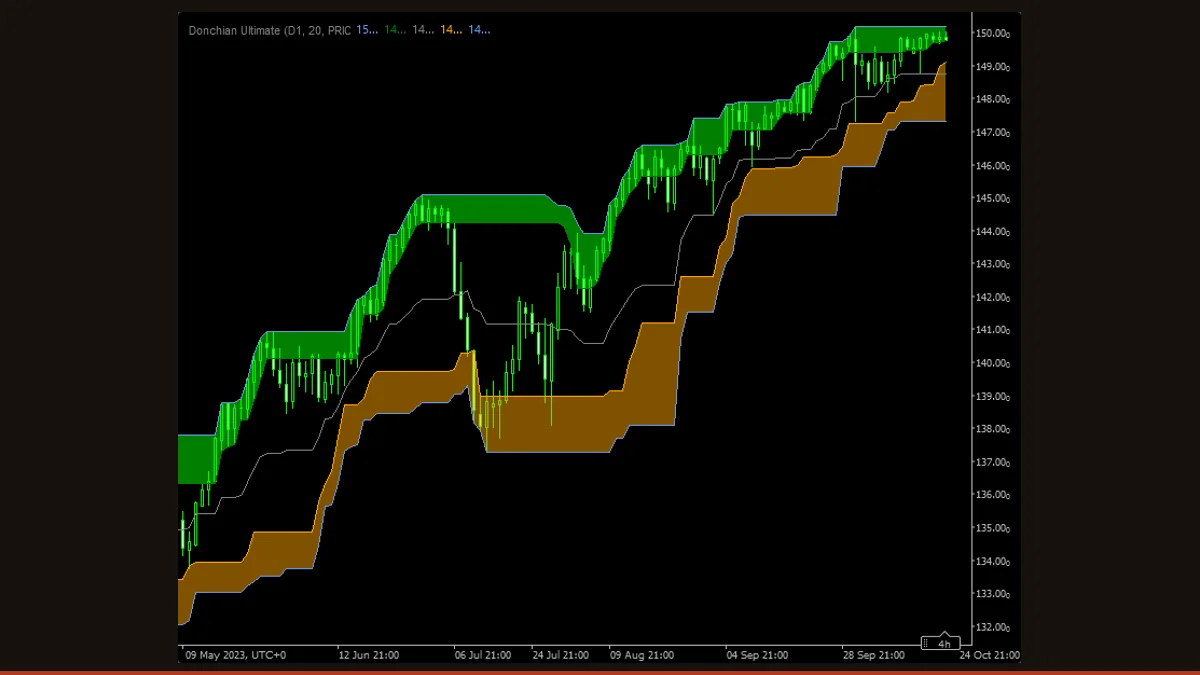
Donchian Channels plot the highest high and lowest low over the last N bars as two flat rails, with an optional midline between them. A break of the upper rail signals an N-bar high; a break of the lower rail signals an N-bar low. This free MT4/MT5 build does not repaint, because the rails only finalize on closed bars.
Donchian Channels are the chart tool that launched a thousand trend-following systems. Built by Richard Donchian and later made famous by the Turtle Traders, they answer one blunt question better than almost anything else on the screen: is price making a new high or a new low over a fixed window? Everything else, the breakout, the stop, the trail, falls out of that single read.
This is the free EarnForex "Donchian Ultimate" build for MetaTrader, distributed under an Apache-2.0 license, so there are no trial timers, no locked inputs, and no paywall. It runs on both MT4 and MT5, plots the channel directly on price, and adds a full alert suite plus the ability to show a higher timeframe's channel on a lower timeframe chart. The core logic, though, is the same one Donchian wrote down decades ago.
What is the Donchian Channels indicator?
The Donchian Channel is a breakout indicator that draws three lines on the price chart: an upper rail equal to the highest high of the last N bars, a lower rail equal to the lowest low of the last N bars, and a midline halfway between them. Because the rails are pure highest-high and lowest-low values, not averages, they sit perfectly flat until price prints a new extreme, then step to the new level.
Richard Donchian developed the concept in the mid-20th century as the backbone of a mechanical trend system, and it became legendary when the Turtle Traders used a 20-day high/low version to enter and a 10-day version to exit. The intuition is simple: if price has just exceeded everything it did for the last 20 bars, the recent balance has broken and a trend may be starting. The channel does not predict, it confirms that a new extreme has actually happened. This particular MetaTrader version stays faithful to that original construction and layers on alerts, optional support/resistance "span" zones, and multi-timeframe display so you can monitor a Daily channel while trading the H1.
How does the Donchian Channels indicator work?
The math is about as transparent as an indicator gets. For every bar, three values are calculated over a lookback of IndPeriod bars (20 by default):
1. The upper rail is the single highest high found anywhere in the last 20 bars. 2. The lower rail is the single lowest low found in the same window. 3. The midline is simply the average of those two, (upper + lower) / 2, giving you the centre of the recent range.
Because the rails are extremes rather than moving averages, they behave in a distinctive way. The upper rail stays dead flat until a candle prints a high above it, at which point it instantly steps up to that new high. The lower rail does the same on the downside. Between breakouts the channel looks like a horizontal corridor, and the width of that corridor is a direct read on volatility: a wide channel means price has covered a lot of ground recently, a narrow one means it has been coiling.
The classic reading follows the Turtle logic. A close beyond the upper rail is an N-bar breakout to the upside (potential long); a close beyond the lower rail is the downside equivalent (potential short). The opposite rail and the midline are natural trailing-stop and exit references. This build adds PriceType control, so the rails can be measured from highest-high/lowest-low (the classic) or from close prices, which produces fewer but cleaner breaks, and the alert options fire when a candle closes back inside the channel or crosses the midline. Crucially, once a bar closes its three channel values are fixed for good, the indicator only updates on closed-bar data, so it does not repaint historical signals.
Donchian Channels settings and parameters
This build exposes a deep input list, but only a handful change the channel's behaviour, the rest govern alerts and notifications. Here is what each of the behaviour-relevant inputs actually does on the chart.
| Parameter | Default | What it does |
|---|---|---|
| IndPeriod | 20 | The lookback length, in bars, used to find the highest high and lowest low. This is the single most important setting. The Turtle default is 20 (a 20-bar breakout); raising it (e.g. 55) gives slower, rarer, higher-conviction breakouts, while lowering it (e.g. 10) makes the rails react faster and produces more, noisier signals. |
| InpTimeframe | PERIOD_CURRENT | Lets you display a higher timeframe's channel on the current chart. Leave it on PERIOD_CURRENT to use the chart's own timeframe, or set it to, say, Daily while trading H1 to trade in the direction of the higher-timeframe breakout. The rails then reflect the larger period's highs and lows. |
| PriceType | PRICE_HH_LL (Highest High / Lowest Low) | Chooses what the rails are measured from. The default uses the highest high and lowest low of each bar (the classic Donchian). Switching to a close-based mode ignores wicks and only registers a breakout when a candle closes beyond the prior extreme, which filters out stop-hunt spikes at the cost of slightly later signals. |
| Shift | 0 | Shifts the whole channel horizontally by the chosen number of bars. A common trick is to set this to 1 so the channel is offset by one bar, which prevents the current forming bar's high or low from instantly being included in its own breakout level, making breakouts cleaner and avoiding self-referential signals. |
| IsShowResistanceSpan / IsShowSupportSpan | true / true | Toggle the shaded support and resistance "span" zones around the rails on or off. They make the channel easier to read at a glance as zones rather than thin lines, but you can disable them for a cleaner chart or when overlaying other tools. |
| AlertCandle | ALERT_PREVIOUS_CANDLE | Decides which bar triggers alerts. The default, ALERT_PREVIOUS_CANDLE, fires only after the previous candle has fully closed, the honest choice that does not repaint. Switching it to the current candle gives earlier but provisional signals that can vanish before the bar closes. |
| IsAlertMidLineBullishCrossing / IsAlertMidLineBearishCrossing | true / true | Enable pop-up/email/push alerts when price crosses the midline up or down. The midline cross is an early, lower-conviction signal that the range balance is shifting before a full rail breakout occurs. |
| IsShowAlert / IsSendEmail / IsSendNotification | false / false / false | The master switches for how alerts are delivered: an on-screen pop-up, an email (requires SMTP set up in MetaTrader options), or a push notification to the mobile app (requires your MetaQuotes ID). All are off by default so the indicator is silent until you opt in. |
Pros and cons (the honest version)
What it does well
- Genuinely free and license-clear (Apache-2.0), no trial limits, locked inputs, or paywalls.
- Runs natively on both MT4 and MT5 from the same project.
- The logic is dead simple and battle-tested, it is the literal Turtle Traders channel, so there is no black-box guesswork about what a signal means.
- It does not repaint: once a bar closes its three channel values are locked, so historical breakouts on your chart are exactly where they happened, keeping visual backtests honest.
- Doubles as a volatility gauge, a widening channel means expansion, a pinching channel means a quiet, coiling market.
- The rails make objective, rule-based stop-loss and trailing-stop levels, which removes a lot of discretionary guesswork.
- Built-in midline, breakout, and failed-breakout alerts, plus the ability to watch a higher timeframe channel on a lower timeframe chart.
Where it falls short
- It lags by construction. A breakout is only confirmed after price has already moved to a new N-bar extreme, so you never enter at the turn, you enter after it.
- In sideways, range-bound markets it whipsaws badly, price pokes through a rail, the channel steps, then price snaps back inside, handing you a false breakout. This is the single biggest weakness of any Donchian system.
- The flat rails only step on a new extreme, so between breakouts the channel says nothing about momentum building inside the range.
- Wick-based breakouts (the default PRICE_HH_LL mode) can be triggered by a single spike or stop hunt; switch to a close-based price type if that bothers you, at the cost of a slightly later signal.
- The forming (current) bar's rail can extend with each tick if that bar prints a new extreme, so the right-most level is provisional until the candle closes, wait for the close, or use the Shift input, before acting.
- Like any single indicator, it has no edge in isolation. Donchian breakouts famously have a low strike rate and rely on a few large trends to pay for many small losers, so they need a trend filter and sound risk management.
Download Donchian Channels free
Enter your email and we'll send you Donchian Channels for MT4, packaged with its original Apache-2.0 licence and author credit. Come back for any of our other free indicators whenever you want one.
We never share or sell your email. One-click unsubscribe in every message.
How to install Donchian Channels on MetaTrader 4
- Download the free Donchian Channels zip from this page.
- Unzip it and locate the .mq4 file (and the .mq5 if you use MT5).
- In MetaTrader, open File then Open Data Folder, and navigate to MQL4/Indicators (or MQL5/Indicators on MT5).
- Copy the .mq4 file into that Indicators folder.
- Restart MetaTrader, or right-click the Navigator panel and choose Refresh so the indicator appears.
- Drag Donchian Ultimate from the Navigator onto your chart.
- In the inputs tab set IndPeriod (start with 20), choose your PriceType and timeframe, enable any alerts you want, then click OK to plot the channel.
Donchian Channels FAQ
Does the Donchian Channels indicator repaint?
No. The indicator only finalizes its rails on closed-bar data, so once a candle closes its highest-high and lowest-low values are locked and will not redraw on later bars, a breakout that showed on your chart stays exactly where it happened. The only thing that moves is the current forming bar, whose rail can extend with each tick if that bar prints a new high or low. Keep the AlertCandle setting on the previous candle, or use the Shift input, and you get clean signals that do not repaint.
What period should I use for Donchian Channels?
The classic Turtle setting is 20 bars for entries and a shorter 10 bars for exits, and that is a sensible starting point. A longer period like 55 gives rarer, higher-conviction breakouts with fewer false signals; a shorter period like 10 reacts faster but whipsaws more. Match the period to your timeframe and trading style, and resist over-optimizing it on past data, robustness matters more than a perfect backtest.
What is the best timeframe for Donchian Channels?
H4 and Daily tend to give the cleanest reads, because a new 20-bar high or low on those timeframes reflects a meaningful shift in the market and trends last long enough to cover the inevitable false breaks. You can use it on M5 or M15, but the lower the timeframe the more whipsaw you will see.
How do I trade a Donchian Channel breakout?
The textbook approach is to go long when price closes beyond the upper rail (a new N-bar high) and short when it closes beyond the lower rail (a new N-bar low), placing your stop at the opposite rail or the midline and trailing it as the channel steps in your favour. The system has a low strike rate by design, so success depends on taking every signal, sizing positions sensibly, and letting the few big trends pay for the many small losses. This is education, not trading advice.
Does it work on MT5, and is it really free?
Yes on both counts. The project ships .mq4 and .mq5 files, so it runs natively on MetaTrader 4 and MetaTrader 5 (the upstream EarnForex build also supports cTrader). It is released under an Apache-2.0 open-source license, which means it is free to download and use with no trial limits, locked features, or hidden costs.
How is a Donchian Channel different from Bollinger Bands or a Keltner Channel?
All three are channels, but the math differs. Donchian rails are the raw highest high and lowest low over N bars, so they sit flat and step only on new extremes, they are a pure breakout map. Bollinger Bands centre on a moving average and flex with standard deviation, and Keltner Channels centre on a moving average and flex with average range. Donchian is the most literal volatility-and-breakout read; the other two are smoother envelopes better suited to mean-reversion and pullback trading.