ZigZag Indicator for MT4 (ZigZagOnParabolic)
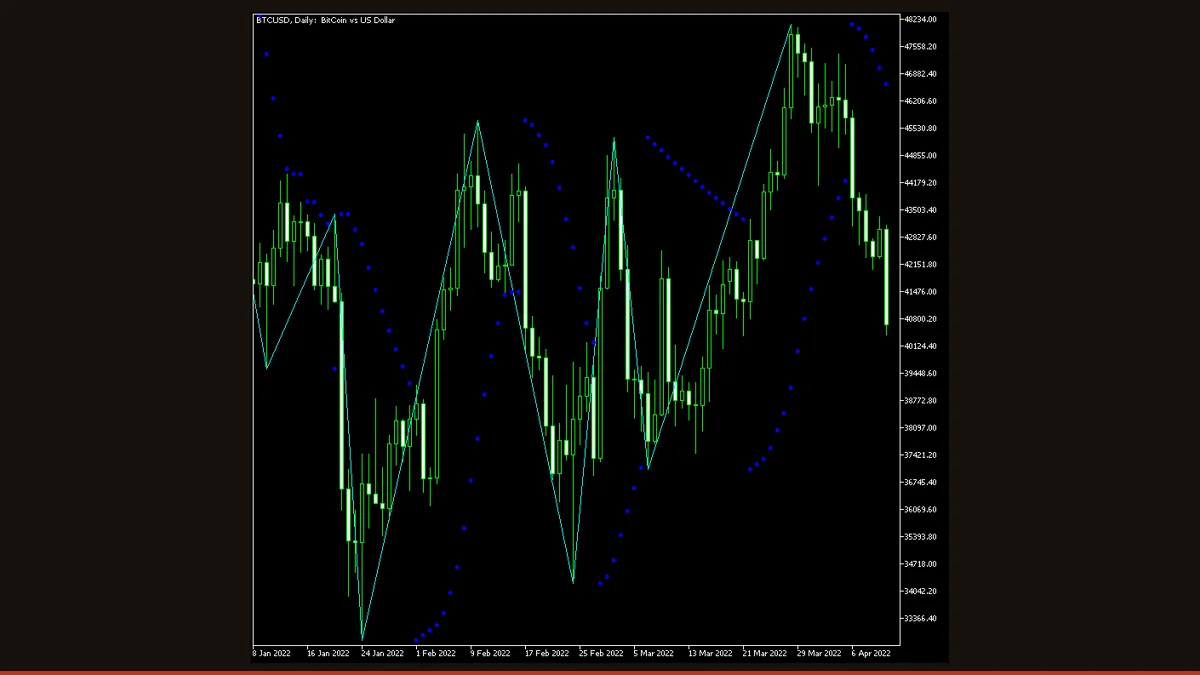
ZigZagOnParabolic is a free MT4/MT5 ZigZag that draws lines between swing highs and lows, using Parabolic SAR flips to mark each pivot instead of a fixed percentage move. It filters out small price noise so the underlying trend structure is easy to read. Note: the most recent leg redraws until SAR confirms the turn.
If you have ever squinted at a forex chart trying to separate the real swings from the noise, the ZigZag indicator is the classic tool for the job. It strips a chart down to its skeleton: a series of straight lines connecting significant highs to significant lows, hiding the small wiggles in between. This particular build, ZigZagOnParabolic, replaces the usual fixed-percentage filter with the Parabolic SAR, so a new pivot is plotted whenever the SAR flips sides.
It is a free, open-source indicator for both MT4 and MT5, with optional pop-up, email, and push alerts when a fresh peak or trough forms. Below we explain exactly how it works, the settings that matter, and, just as importantly, the one behaviour that trips up traders who do not understand it: the last leg redraws.
What is the ZigZag indicator?
The ZigZag indicator is a chart overlay that connects alternating swing highs and lows with straight diagonal lines, filtering out minor price movements so the dominant trend structure stands out clearly. ZigZagOnParabolic is a variant that decides where each swing point sits using the Parabolic SAR rather than a minimum-percentage or minimum-pip retracement.
In a standard ZigZag, a new pivot is confirmed only after price reverses by a set amount (for example 5%). In ZigZagOnParabolic, the trigger is the Parabolic SAR reversal: while SAR sits below price the indicator tracks the running high, and the moment SAR jumps above price it locks in that high as a peak and starts hunting for the next low. The result is the same familiar zigzag line, but the swing-detection logic is driven by SAR's volatility-adaptive dots instead of an arbitrary fixed threshold.
It is a visual and structural tool, not a buy/sell signal generator. Traders use it to spot Elliott Wave counts, draw trendlines and Fibonacci retracements between confirmed pivots, and gauge whether a market is making higher highs and higher lows.
How does the ZigZag indicator work?
Under the hood, the indicator runs a standard Parabolic SAR calculation and watches for the point where the SAR dots flip from one side of price to the other.
Parabolic SAR recap. SAR plots a trailing dot each bar. The dot accelerates toward price using an acceleration factor that starts at the Step value (default 0.02) and increases by that same step each time a new extreme is made, capped at Maximum (default 0.2). When price crosses the SAR, the dot flips to the other side and the trend is considered reversed.
Turning SAR into a ZigZag. While SAR is below price (uptrend), the indicator records the highest high reached. When SAR flips above price, that recorded high becomes a confirmed peak and a line is drawn to it; the indicator then tracks the lowest low until SAR flips back below price, locking in a trough. Connecting these alternating peaks and troughs produces the zigzag.
The redraw, read this part. Because a pivot is only confirmed when SAR flips, the current leg is provisional. As long as price keeps pushing in the same direction, the indicator keeps extending the active high or low, so the last segment moves and re-anchors in real time. This is normal ZigZag behaviour, not a bug, but it means you cannot trade the freshest pivot as if it were final, and a leg that looks 'set' on the live bar can shift before SAR actually reverses. Confirmed pivots (everything before the current leg) do not move.
The ExtremumsShift option controls timing: 'ChartTime' anchors each pivot at the bar where the high/low actually occurred, while the detection-time option anchors it at the bar where SAR confirmed the turn (which is always later). The History setting limits how many bars back the indicator bothers to calculate.
ZigZag settings and parameters
The two settings that change behaviour the most are Step and Maximum, they are the Parabolic SAR acceleration factors, so they directly control how sensitive the zigzag is. Here is what each input does.
| Parameter | Default | What it does |
|---|---|---|
| Step | 0.02 | Parabolic SAR acceleration factor. Higher values make SAR catch up to price faster, so it flips sooner and the zigzag marks more, smaller swings. Lower values give fewer, larger swings that ignore minor pullbacks. |
| Maximum | 0.2 | The cap on the acceleration factor. A higher ceiling lets SAR tighten aggressively in strong trends (earlier flips, more pivots); a lower ceiling keeps SAR looser so only bigger reversals register as new swing points. |
| ExtremumsShift | ChartTime | Where each pivot is anchored in time. 'ChartTime' places it on the bar of the actual high/low; the detection-time option places it on the later bar where SAR confirmed the reversal. ChartTime is best for drawing Fibonacci and trendlines. |
| History | 0 (all bars) | How many bars back to calculate. 0 processes the whole visible history. Set a smaller number on heavy charts or long histories to reduce load and speed up redraws. |
| EnableNativeAlerts | false | Pops a MetaTrader alert window when a new peak or trough is confirmed. Useful if you watch multiple pairs and want a nudge when fresh structure forms. |
| EnableEmailAlerts | false | Sends an email on each confirmed pivot. Requires your email/SMTP settings to be configured in the terminal's Tools > Options > Email tab, or it does nothing. |
| EnablePushAlerts | false | Sends a push notification to the MetaTrader mobile app on each confirmed pivot. Requires your MetaQuotes ID to be entered under Tools > Options > Notifications. |
Pros and cons (the honest version)
What it does well
- Free and open-source for both MT4 and MT5, with no licensing strings attached.
- Cuts chart noise so trend structure, higher-highs/lower-lows, and Elliott Wave counts are easy to read at a glance.
- SAR-based pivots adapt to volatility automatically instead of relying on one fixed percentage that suits only some pairs.
- Ideal anchor points for drawing Fibonacci retracements, trendlines, and measuring swing legs.
- Built-in pop-up, email, and push alerts notify you the moment a new pivot is confirmed.
- ChartTime anchoring places pivots on the exact high/low bar, keeping your retracement levels accurate.
Where it falls short
- The current (newest) leg redraws and re-anchors until SAR confirms the reversal, you cannot treat the live pivot as final, and this is the single biggest source of confusion.
- It is a lagging, descriptive tool: pivots are only confirmed after the turn has already happened, so it is not a leading entry signal.
- Inherits Parabolic SAR's weakness, in choppy, sideways markets SAR flips constantly, producing a jumpy zigzag with too many small swings.
- Not suitable for mechanical backtesting of pivot 'signals', because the redraw means historical confirmed points look cleaner than they were in real time.
- Sensitivity depends entirely on Step and Maximum; the defaults may over- or under-filter a given pair and timeframe until you tune them.
Download ZigZag free
Enter your email and we'll send you ZigZag for MT4, packaged with its original Apache-2.0 licence and author credit. Come back for any of our other free indicators whenever you want one.
We never share or sell your email. One-click unsubscribe in every message.
How to install ZigZag on MetaTrader 4
- Download the indicator zip from the link on this page.
- Extract the zip and locate the ZigZagOnParabolic .mq4 file (use the .mq5 if you are on MT5).
- In MetaTrader, open File > Open Data Folder, then go to MQL4/Indicators (or MQL5/Indicators on MT5).
- Copy the indicator file into that Indicators folder.
- Restart MetaTrader, or right-click the Navigator panel and choose Refresh so the indicator appears.
- Drag ZigZagOnParabolic from Navigator onto your chart.
- In the Inputs tab, adjust Step, Maximum, and the alert toggles to taste, then click OK.
ZigZag FAQ
Does the ZigZag indicator repaint?
The last (current) leg redraws, it keeps extending and re-anchoring until Parabolic SAR confirms the reversal. This is normal for every ZigZag and is the behaviour to understand before using it. Once a pivot is confirmed (i.e. it is no longer the active leg), it stays put and does not move. So treat confirmed pivots as reliable and the newest, still-forming pivot as provisional.
What do the Step and Maximum settings actually control?
They are the Parabolic SAR acceleration factors. Step (0.02) sets how fast SAR speeds up toward price, and Maximum (0.2) caps that speed. Raising them makes SAR flip sooner, so the zigzag marks more frequent, smaller swings; lowering them gives fewer, larger swings that ignore minor pullbacks.
What timeframe works best?
H1, H4, and Daily give the cleanest results because swings are larger and SAR flips less. On M1 to M15 the SAR chops back and forth in noise, producing a jittery zigzag with many small, frequently redrawing legs. Match the timeframe to your trading style.
Is it free, and does it work on MT5?
Yes on both counts. ZigZagOnParabolic is free and open-source, and ships in both MT4 (.mq4) and MT5 (.mq5) versions. Drop the matching file into the Indicators folder of your platform and refresh the Navigator.
Can I trade signals straight off the ZigZag pivots?
Not directly. Because the newest pivot can shift until SAR confirms, the indicator is descriptive, not a leading signal generator. Use it to read structure and place Fibonacci or trendline anchors, then confirm entries with price action or a separate signal rather than acting on the live, unconfirmed swing.
How is this different from the standard MetaTrader ZigZag?
The built-in ZigZag confirms a pivot after a fixed depth/deviation/backstep retracement. ZigZagOnParabolic instead confirms a pivot when the Parabolic SAR flips sides, so its swing detection adapts to volatility through SAR's acceleration rather than a fixed setting, and it adds pop-up, email, and push alerts.